Setup Guide
Once you have your repeater in hand, install the latest repeater firmware on it (requires Google Chrome and the repeater to be connected via USB). Once it completes, you will be prompted to configure it. You can also return to the MeshCore Flasher page in the future if you skipped this step.
Do Not Install Repeaters Without Permission (or Permits) from the Landowner: While planning a repeater deployment, make sure you have permission to wherever you are placing it. This will both ensure it will remain in place and won't give people a negative experience of MeshCore (and the LoRa Project) when they encounter a device in the wild.
Naming Convention
Start with the province you're based in (bhd = Ulster, dub = Lienster, noc = Connacht, snn = Munster see regions as to why these names), add a geographic designation, such as collinhill if it's located on the top Collin Hill, or holywood if it's in the Holywood downtown area, and finally add your handle (optional) or number designation if there's a few of them (such as lisburn-01, lisburn-02).
If you want to provide more detail around these nodes, you can always add that in the Owner Information field users can retrieve as guests via the telemtry feed. Keeping the names concise and something that can be easily filtered by in the MeshCore client app will be something you appreciate in the future.
Radio
Use the UK Narrow Preset, which is now the default when a node is flashed, but always confirm that is the case.
Location
Do not set a location until you have actually deployed the repeater there, doing so makes it difficult for other users to know what is or isn't within range. See Deployment Best Practices
Pick a location on the map either directly where the repeater is, or within a 30m of it - similar altitude if possible. This helps others know when planning to put their repeaters if they will be able to reach you or not. You repeater will not be mapped on MeshMapper until you provide a location or have the regions set correctly. If this is a house / attic repeater, you can use a nearby intersection or landmark.
Terminal Settings
There is one command you can only run via the terminal, and that is retrieving the private key of the repeater. Do this if you want to be able to replace this repeater or reformat it in the same location and keep the same identity and history when it comes to the Mesh Mapping results (and so you don't have to add a new repeater to your device to manage it). If you lose the private key, please don't use one of the vanity public key generators to recreate the prefix of the old one, that breaks a lot of pathing because you've now added a duplicate instance in everyones nodes (which keep both the short and long pub keys).
The MeshCore Flasher page has a Console button you can use to open a terminal session to run these commands, you can also run them via the CLI section of the MeshCore app. If you have picocom installed and want to do this via the old school way, picocom -b 115200 /dev/tty.usb...(or device) --imap lfcrlf should be enough info for you to open a session that way.
# retrieve the private key to copy it
get prv.key
# set your custom key & reboot so it takes effect
set priv.key new_key
reboot
Required Settings for LoraProject
Regions tl,dr; the official regions:
These are what we ask people to enable to help grow the Mesh here in Ireland, these based off of the Sydney Mesh advice, but tweaked for Ireland.
# Broadcast locally every 4 hours about the repeater
set advert.interval 240
# Tell the whold mesh every 165 hours to skew time of day
# Set to 0 unless this repeater is already deployed in it's intended location
set flood.advert.interval 165
# prevent repeating old messages by accident
set loop.detect minimal
# use six letter prefixes instead of two, reduces path conflicts
set path.hash.mode 2

# set the dutycycle to 10% - EU Regs so the fuzz don't shut us down
set dutycycle 10

# cap how far away you'll repeat something - max distance for 3 byte packet
set flood.max 21

# with 1.16 you can set a different max for messages without scope
# this is the alternative to a hard drop of unscoped messages
# you can hear your neighbors but not pickup stray packets from france
set flood.max.unscoped 4

# txdelay: start with 1.4 see page on txdelay to determine if to lower it
set txdelay 1.4
# Region configuration

# configure at minimum the Island of Ireland region
# without this your repeater will not be mapped

# 2026-08-14: FW 1.16 or later, just three commands, pick one for your location

# bhd (Ulster)
region def ioi bhd|* ioi-admin|* iom|* sco|* wls|* eu|* europe
region default ioi
region home bhd
# dub (Leinster)
region def ioi dub|* ioi-admin|* iom|* sco|* wls|* eu|* europe
region default ioi
region home dub
# noc (Connacht)
region def ioi noc|* ioi-admin|* iom|* sco|* wls|* eu|* europe
region default ioi
region home noc
# snn (Munster)
region def ioi snn|* ioi-admin|* iom|* sco|* wls|* eu|* europe
region default ioi
region home snn

# 2026-04-24: If you flashed with the 1.15 version, it is much easier:
region default ioi
region put ioi-admin
region put eu # europe-wide traffic
region put europe #europe legacy
region put sco # Scotland repeats ioi, out of courtesy, we repeat for them
region put iom # Isle of Man
region put wls # Wales
# then only put one of these, unless your repeater is
# intentionally serving multiple regions
region put bhd ioi # Ulster
region put dub ioi # Leinster
region put noc ioi # Connacht
region put snn ioi # Munster
region save

# If you are still on 1.14 Firmware:
region put ioi
region allowf ioi
region put ioi-admin
region allowf ioi-admin # Allows wardriving to happen
region put eu
region allowf eu
region put sco
region allowf sco # Scotland repeats ioi, out of courtesy, we repeat for them
region put iom
region allowf iom # Isle of Man
# put the region the repeater
region put bhd ioi
region allowf bhd # Ulster repeater
region put snn ioi
region allowf snn # Munster repeater
region put dub ioi
region allowf dub # Leinster repeater
region put noc ioi
region allowf noc # Connacht repeater
# save the region settings
region save

# make sure the radio rechecks the RF landscape every 8 minutes
set agc.reset.interval 500
# send multiple acknowledgements, makes remote admin of a node easier
set multi.acks 1
# keep your node from draining its battery if using it
powersaving on

# optional, set a blank guest password, letting others check on the repeater
set guest.password
Owner Information Keep your guest password blank so others can load telemetry from the unit. Users can also read the Owner Information, which is where you can share the configured region info like this (long press the response from the region command and just paste it from the mobile app):
Web UI Settings
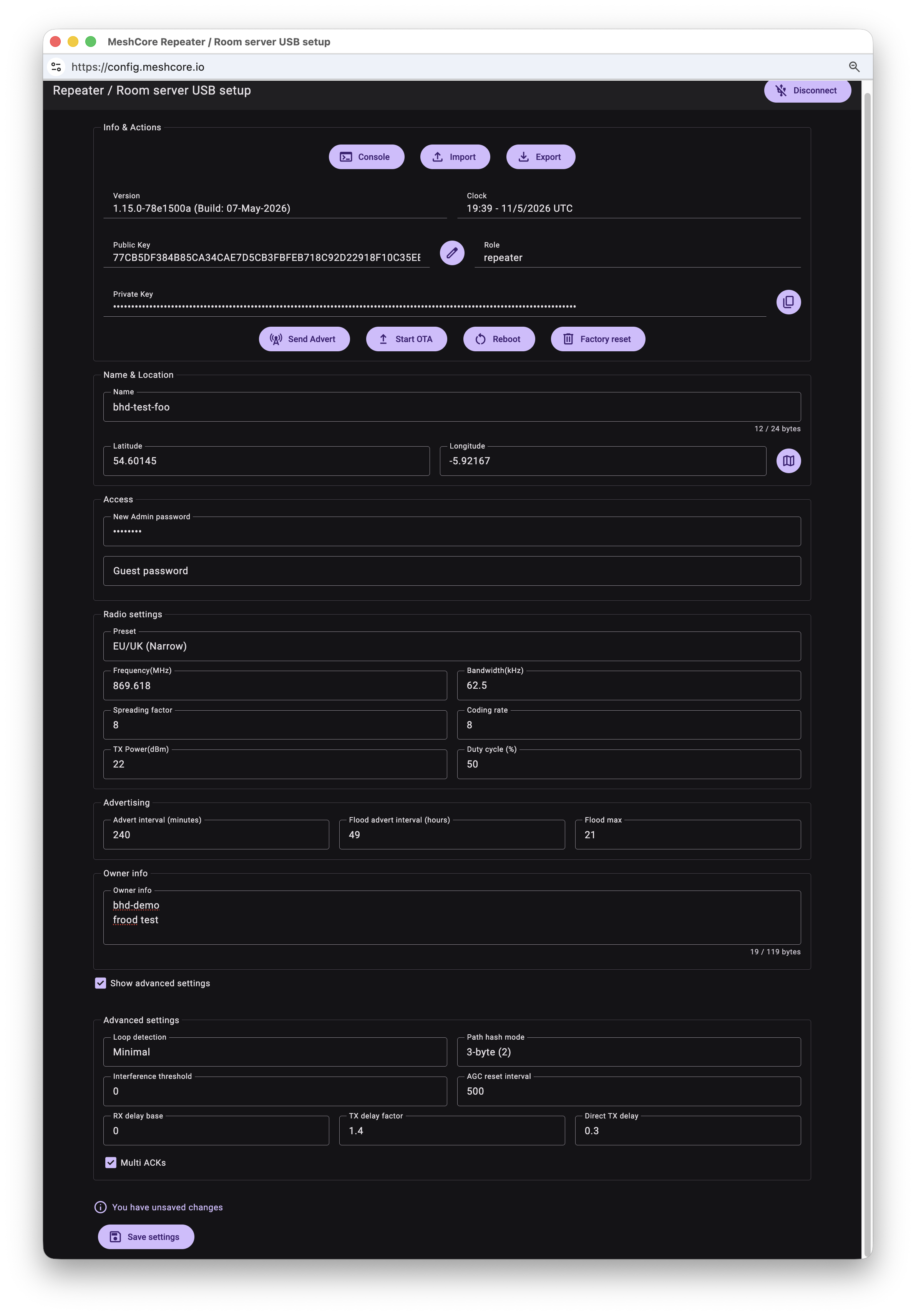
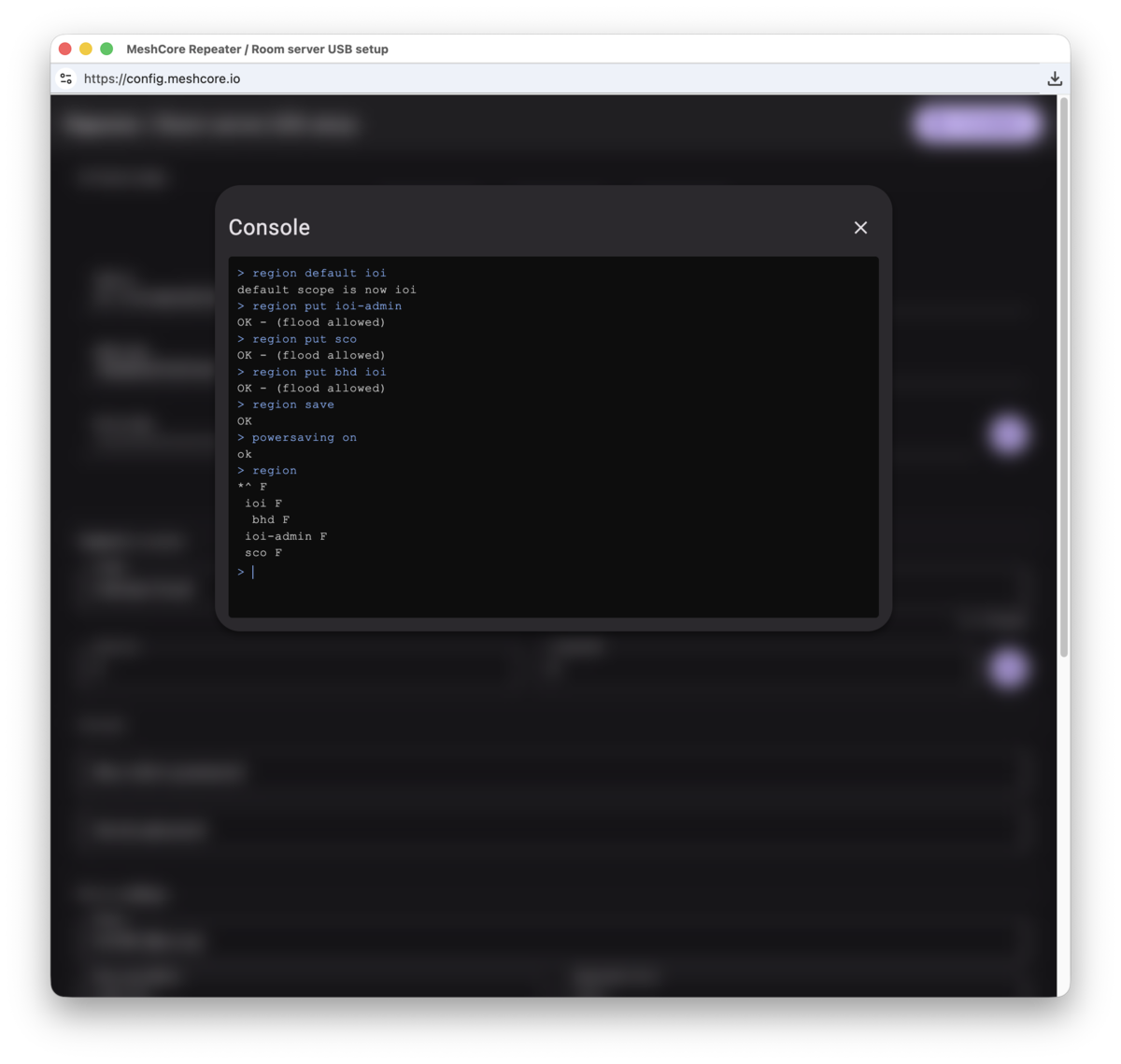
You can use the Advanced section of the Flasher to set almost all of the above settings, except for region and powersaving at this time, for those you can just open the console from within that window and enter them.
Best Practices
When preparing for and deploying a repeater, we ask folks follow these guidelines:
1) Do Not Set a False Location: It is tempting to put the coordinates of where you think the repeater will go when you deploy it tomorrow, but maybe you won't get to it like you thought. Maybe you find that access to the location is more difficult or there's better signal one hill over. Wait until after you have placed the repeater before changing the location away from 0,0 (the default, no location, values).
CLI Command to reset:
set lat 0
set lon 0
# if using GPS, have it use the manual one until deployed
gps advert prefs
# perform a manual advert to update folks who have the wrong info
advert
2) Keep Repeat Off: Keeping repeat off while the repeater is sitting on your bench, in your car, or your shed, keeps the duplication of traffic and signal broadcasts to a minimum. Having four repeaters "staged" has an amplification effect on all traffic and will make your life and the life of your neighbors miserable. While also spamming the loraproject.org observer network.
This will prevent Node Discovery and Path Tracing from working until repeat is enabled. Don't forget to turn this back on when deploying in the field.
CLI Command:
3) Perform Manual Adverts: Until the repeater is in it's installed location and repeat is enabled, don't have it perform automdated adverts. Set the advert interval the 0, your local devices will still receive the zero hop advert, even with repeat off.
CLI Command:
Health Check
Once you've installed the repeater, run a Health Check - get a code from that link and post it in the channel #ioi-test - it will show you how far it went across the mesh. If it doesn't go very far, check you have set the region scope for #ioi-test to be ioi, and that you have flood enabled on your repeater for ioi.
TX Delay
Don't know what to put for set txdelay, follow this flowchart:
%%{ init: { 'flowchart': { 'defaultRenderer': 'elk' } } }%%
  flowchart TB
    Q1(First repeater\nsetup?)
    Q2(Temporary or\nshort-term placement?)
    Q3(Just placed\nunder 3 days?)
    Q4(Few neighbours\n3 or fewer?)
    Q5(Attic / window /\nbelow roofline?)
    Q6(Primarily want to\nconnect yourself to the mesh?)
    Q7(Above-roofline mast or\ntop of apartment block?)
    Q8(Hill overlooking\nneighbourhood?)
    Q9(Mountaintop with\nviews for miles?)
    Q10(Directional antenna /\nspecial link?)
    Q11(Mobile /\nvehicle?)

    R1([1.4])
    R2([1.4])
    R3([1.4])
    R4([1.4])
    R5([1.0])
    R6([1.0])
    R7([0.6])
    R8([0.6])
    R9([0.3])
    R10([0.25])
    R11([2.0])
    R12([1.4])

    Q1 -->|Yes| R1
    Q2 -->|Yes| R2
    Q3 -->|Yes| R3
    Q4 -->|Yes| R4
    Q5 -->|Yes| R5
    Q6 -->|Yes| R6
    Q7 -->|Yes| R7
    Q8 -->|Yes| R8
    Q9 -->|Yes| R9
    Q10 -->|Yes| R10
    Q11 -->|Yes| R11
    Q11 -->|No| R12

    Q1 -->|No| Q2
    Q2 -->|No| Q3
    Q3 -->|No| Q4
    Q4 -->|No| Q5
    Q5 -->|No| Q6
    Q6 -->|No| Q7
    Q7 -->|No| Q8
    Q8 -->|No| Q9
    Q9 -->|No| Q10
    Q10 -->|No| Q11

    R1 ~~~ R2
    R2 ~~~ R3
    R3 ~~~ R4
    R4 ~~~ R5
    R5 ~~~ R6
    R6 ~~~ R7
    R7 ~~~ R8
    R8 ~~~ R9
    R9 ~~~ R10
    R10 ~~~ R11
    R11 ~~~ R12

    classDef question fill:#f8fafc,stroke:#cbd5e1,color:#1e293b
    classDef r14 fill:#f1f5f9,stroke:#cbd5e1,color:#475569
    classDef r10 fill:#fffbeb,stroke:#fcd34d,color:#d97706
    classDef r06 fill:#f0fdfa,stroke:#5eead4,color:#0d9488
    classDef r03 fill:#eff6ff,stroke:#93c5fd,color:#1d4ed8
    classDef r025 fill:#faf5ff,stroke:#d8b4fe,color:#6d28d9
    classDef r20 fill:#fff1f2,stroke:#fda4af,color:#dc2626

    class Q1,Q2,Q3,Q4,Q5,Q6,Q7,Q8,Q9,Q10,Q11 question
    class R1,R2,R3,R4,R12 r14
    class R5,R6 r10
    class R7,R8 r06
    class R9 r03
    class R10 r025
    class R11 r20
Other useful CLI commands:
# see what regions you've allowed on the repeater
region list allowed
# manually push the RF settings for Ireland
set radio 869.6179809,62.5,8,8
# set the transmit power to 22 dbi
set tx 22
# set coordinates
set lat 53.48
set lon -7.73
# check if you have gps
gps on
# set the clock from gps - now done automatically every 30 minte
gps sync
# have the node advertise it's GPS coordinates as its location
gps advert share
# use the location set in preferences - default
gps advert prefs
# set the location in preferences from the GPS coords (useful if you power off GPS later)
gps setloc
Remote Updates
OTA Fix for the nRF52 based boards, however you still need to get pretty close to the device in order to flash it successfully.
If you want to put the repeater in a really hard to get to spot and aren't as concerned about battery life, the ESP32 based boards allow for update WiFi - trigger an OTA update, and then connect to SSID device type and go to http://192.168.4.1/update to upload their firmware. Doesn't require special apps and these boards are more likely to have support for an external 2.4ghz antenna. Like this £9 one from Seeed.